Logs
Confirm reports are reaching your tracker, and spot duplicates.
Logs (Project → Logs) is a submission log — every report the widget has sent,
with its delivery status. It's the first place to check if something seems to have gone
missing.
What's shown
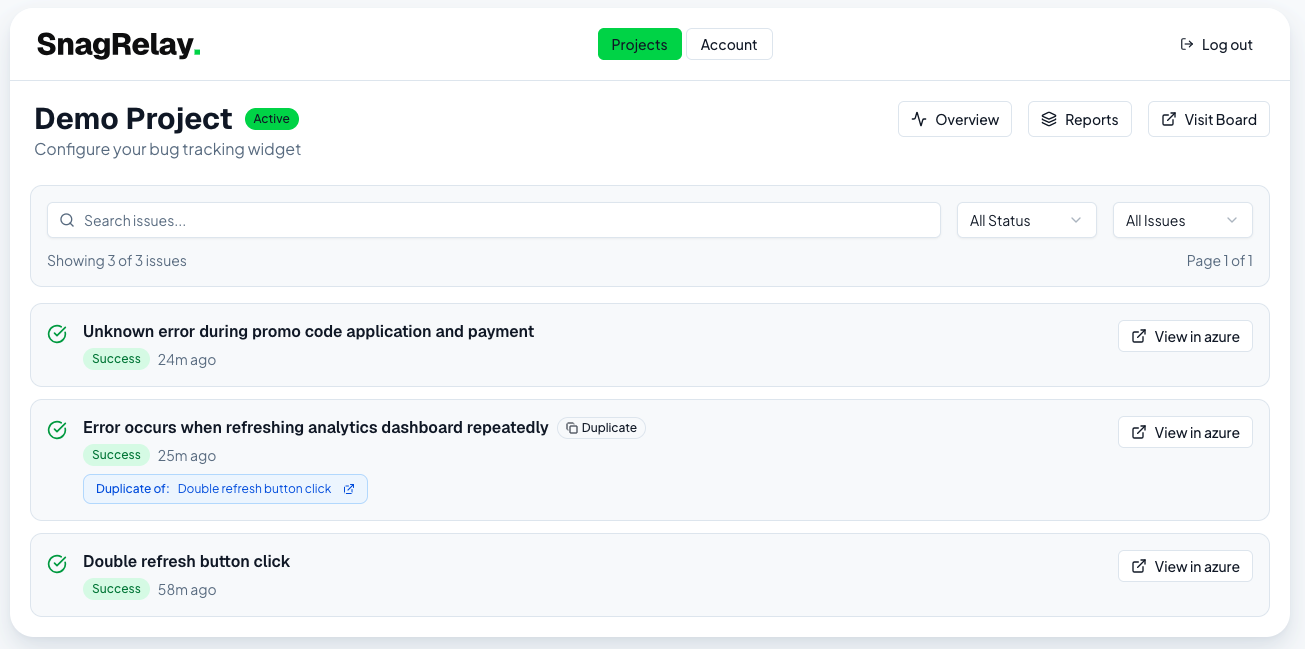
Per row: title, status badge (Success / Failed / Pending), priority, assignee (with a sparkles icon if AI-suggested), and a Duplicate badge with a link to the original if one was detected.
Failed rows show the underlying error message — usually an expired/disconnected integration or a tracker-side permission issue.
Filters
- Search by title
- Status — All / Success / Failed / Pending
- Uniqueness — All Issues / Unique / Duplicates
Actions
Each row links out to a "View in..." link naming your connected tracker — opening the actual issue in Jira, Linear, Trello, GitHub, GitLab, or Azure DevOps. There's no assign/delete/mark-duplicate action from this list; those happen in your tracker, or (for duplicates) automatically.
Screenshot